Change Management with Auto-Remediation

Auto Remediation

Automate the entire ticket-to-remediation workflow transforming reactive incident management into a proactive, automated remediation engine. With auto-remediation for Triggered and Preventive Automation, network changes are generated, approved, and executed faster—reducing manual effort, ensuring compliance, and dramatically cutting mean-time-to-repair (MTTR).

Closed-Loop Automation From Ticket Generation

Automatically generate and manage change tasks directly from diagnostic results, creating a closed-loop from problem detection to corrective action. When an integrated ITSM (like ServiceNow) creates a ticket, it can trigger a NetBrain Triggered Alert Framework to ask to remediate an intent. A change management task is automatically created and requires only human approval and execution.

  • Manual Approval Flow: For compliance or precaution, tasks await an approver’s manual approval before execution.
  • Pre-Approved Flow: For well-known, low-risk issues, tasks are generated in an Approved state, ready for immediate execution.

REAL-WORLD USE CASE

Unauthorized Device Detection

A monitoring tool detects an unauthorized device on a switch port and opens a ServiceNow ticket. NetBrain triggers a remediation intent, auto-generates a change task to shut down the port. An engineer approves and executes the task, resolving the issue promptly in the ticket.

From Scheduled Assessments in Preventive Automation

Proactively catch and fix compliance issues. Enable auto-remediation on scheduled ADT or Golden Intents. When they run and find violations, change tasks are auto created for approval and batch remediation.

The User Flow
  1. Define: Build or select a Network Change Template with the remediation logic.
  2. Configure: In the new Auto Remediation Management center, link your remediation intent and set the approval method (Manual or Pre-Approved).
  3. Trigger: An incident ticket (TAF) or a scheduled check (PA) executes the intent and auto-generates the change task.
  4. Approve & Execute: Approve (if required) and execute the task. The fix is documented and linked back to the original ticket.

REAL-WORLD USE CASE

VTY Access-List Compliance

Scheduled golden intents periodically check for violations of VTY access lists. Each run auto-generates a change task with all non-compliant devices mapped. An engineer approves and executes a single batch fix, ensuring continuous compliance.

Centralized Change and Auto Remediation Management

Centrally view, manage, and control all changes and auto-remediations from a single pane.
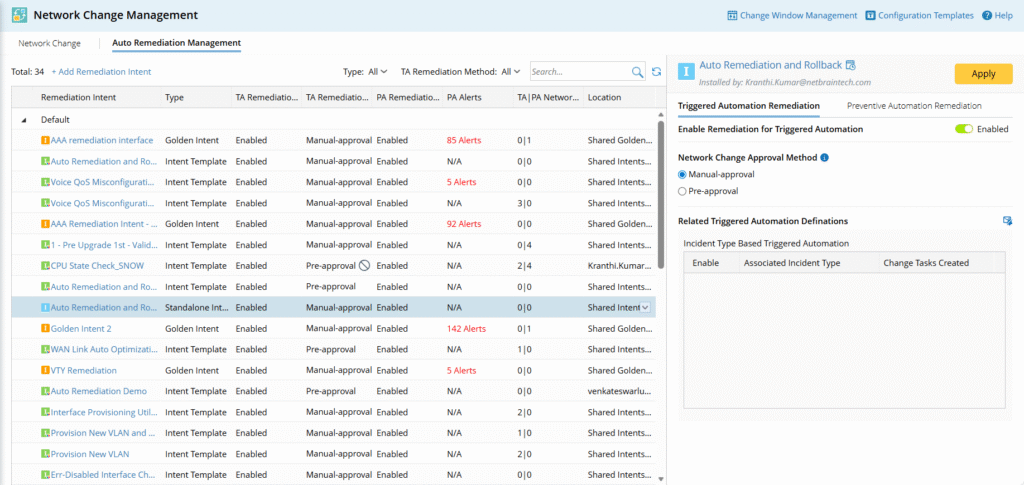
  • Enable/disable remediation for intents.
  • Set approval methods.
  • Group intents into categories (e.g., “CIS Benchmark Compliance”).
  • View task generation statistics and statuses at a glance.

Enhanced Visibility Change Log

The change log now provides crystal-clear insight into every task’s origin and status.

  • New Columns: See the Source Type (Manual, Triggered Diagnosis, Scheduled Intent) and Source (e.g., Ticket ID, Intent Name).
  • New Statuses: Track Pending Approval, Partial Approval, and Executed.
  • Powerful Filtering: Quickly find tasks by source, execution status, result, or time range.
For the Network Engineer

Move from manual, ticket-driven firefighting to an automated remediation pipeline. Reduce context switching and execute pre-defined, safe changes in minutes.

For the Change Manager

Maintain oversight and compliance with configurable approval gates. Pre-approve low-risk, repetitive fixes to accelerate resolution while keeping all changes documented and auditable.

For the Operations Leader

Scale your team’s impact. Embed expert remediation procedures into automated workflows, ensuring consistent, best-practice responses to common incidents and compliance drifts.


What Makes It Different
  • Closed-Loop Automation: Directly connects diagnostic results to corrective change tasks.
  • Flexible Governance: Supports both manual approval for control and pre-approval for speed.
  • Unified Management: A single pane to manage all automated remediation policies.
  • End-to-End Audit Trail: Every auto-generated task is fully documented, from triggering ticket to executed change.

Trusted by Top Enterprises

“ Troubleshooting without NetBrain is like troubleshooting in the dark.”

Network Administrator Thomson Reuters
Testimonials & Case Studies