View On-Demand Demo
See NetBrain in action immediately with our on-demand demo. Get a first look at network automation, AI, and real-time observability.
Troubleshoot in natural language, ask diagnostic questions and receive context-rich responses, dynamic maps, and action plans for streamlined issue resolution.
Your translator and interface between engineers and their networks. Use natural language input to easily access network data like IP addresses, DNS, neighbors, and device logs without using CLI or a complex network management tool. AI will execute the automation for you and summarize the output in natural language in any format.
Unlock the power of instant network configuration validation and auto-remediation. Our AI-driven solutions ensure that your network operates seamlessly, allowing for immediate detection and correction of issues as they arise.
Experience real-time monitoring that validates your network configurations instantly. With our auto-remediation capabilities, you can resolve potential issues before they impact your operations, keeping your network robust and reliable.

Say goodbye to cumbersome troubleshooting processes. Our AI-powered action plans simplify complex problem-solving, enabling your IT teams to focus on strategic initiatives rather than getting bogged down in technical difficulties. Enjoy more efficient operations and enhanced network performance with our cutting-edge technology.
The AI Bot assists engineers by providing actionable insights during core workflows. It answers network-specific “how-to” questions with tailored action plans and leverages the Digital Twin data model for optimal results.


Next, the AI Bot rapidly executes automation and multi-vendor CLI in conjunction with the no-code automation in the background.
It presents summarized output in natural language, providing users with easily scannable tabular data and easy-to-interpret summary dashboards of automation results.
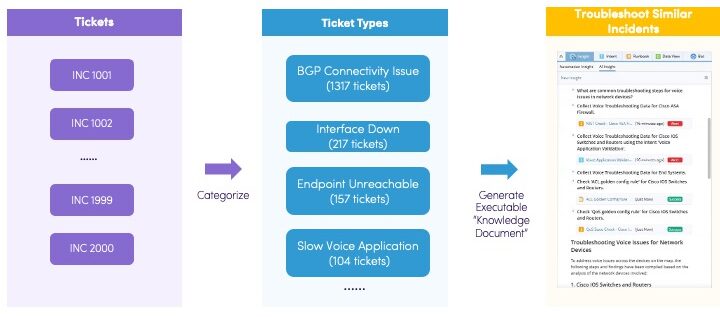
AI automatically processes, understands, and analyzes historical ticket data, teaching the automation and human how to troubleshoot similar incidents proactively in the future.
Streamline network operations, accelerate problem-solving, and build a more resilient network by turning your historical ticket data into actionable intelligence.

How it Works
Gain insights needed to troubleshoot incidents at an unprecedented scale.

Analyze and summarize any mapped area of your network using AI to automate manual tasks and checks. Gain faster root-cause diagnostics and exponentially enhance network intelligence by leveraging results from tens of thousands of automations simultaneously. Maintain control as the senior engineer while the AI, guided by your expertise, conducts reasoning to answer critical questions about your network.
NetBrain’s AI-driven insights help you tackle a wide range of network challenges with ease. For example:


Find and access all automation related to a mapped area of your network in a single place, including golden intent, golden config, ADT intent, intent from the observability dashboard, published intent, CLI, and config.

Stop wasting time trying to interpret data. Start diagnosing.
A workflow embedded AI companion that helps plan and recommends actions keeping engineers in control but out of the time-consuming investigative work. Empowers every engineer with the expertise and practical experience of a senior specialist, turning complex operational tasks into clear, actionable insights. Allows engineers to focus on core issues earlier, significantly reducing MTTR.
| Typical Troubleshooting Workflow | How does NetBrain reduce MTTR? | |
|---|---|---|
| Identify the Problem Context | → | Use Dynamic Maps to quickly pinpoint and visualize the problem area. |
| Decide What Automation to Use
Refine and Iterate
|
→ | Use Runbook to automate manual workflows; Use AI to recommend the right automations for each issue. |
| Execute the Automation | → | Run all automations from one place. |
| Interpret the Automation Results
Refine and Iterate
|
→ | Use AI to analyze and summarize runbook results, quickly highlighting root-cause clues and actionable insights. |
| Document and Report | → | Embed AI-generated insights directly into one-click documentation and the Incident Pane, making it faster to document, collaborate, and drive resolution. |
Saves time reading raw outputs, correlating results across steps, and deciding what to do next. Runbook Companion compresses that cycle by converting runbook evidence into clear summaries, answers, and recommended next actions so engineers can move faster and more consistently from results to decision to action.
Recommends suitable automations for cases without resolving the network problem, helping users apply the company’s best practices.
Generates concise natural-language summaries with initial conclusions. AI proactively recommends the most appropriate automation tools—including CLI commands and NetBrain automation resources—and translates senior-level expertise into clear, actionable guidance.
AI Runbook Companion can:
For the NoC Engineer in a Hurry
No more manually reading through CLI outputs, comparing tables, or deciding what to check next. Ask questions in plain English and get clear answers—right inside the runbook.
Example prompts you can use today:
For the L2 and L3 Engineers
When a runbook doesn’t fully resolve the issue, AI recommends specific, best-practice automations to apply next including CLI checks, Golden Configs, Intents, or full Runbook Templates, keeping every engineer aligned with expert workflows.
For Leaders Tracking MTTR Efficiency
Get junior engineers to act like seniors. Keep troubleshooting consistent. Move from results to action in minutes, not hours.
| Scenario | Without AI Companion | With AI Companion |
|---|---|---|
| Voice quality issues | Manually trace calls, check QoS on each device, compare outputs | Ask: “Troubleshoot voice issues from 10.8.1.4 to 10.8.3.134” → AI suggests path analysis, QoS checks, and relevant intents |
| Change validation | Review pre/post snapshots device-by-device | Ask: “Analyze the impact of these changes” → AI summarizes differences and flags risks |
| Outbreak investigation | Run multiple ping/trace commands, correlate in spreadsheets | Ask: “Summarize batch ping results as a table” → AI returns clean table with loss/jitter highlighted |
The Investigation Engine: Where Agentic AI Meets Automation
Deep Diagnosis is an agentic AI capability that iteratively investigates across the live digital twin and intent-based automation to identify root causes fast.

Deep Diagnosis isn’t just another analytics tool; it’s your autonomous, reasoning-driven partner. It ingests network context from the live digital twin, executes iterative checks, and delivers evidence-backed conclusions. This allows you to maintain control while the AI, guided by your expertise, handles the heavy lifting of root cause analysis.
NetBrain AI is built on three explicit principles that ensure it is safe, defensible, and aligned with how real network operations teams work:

Deep Diagnosis is not a static script. It is a multi-agent system that dynamically determines how to solve your network problem.
Each agent executes a clearly defined stage of the workflow, ensuring modular, predictable, and traceable diagnostic behavior.
Leverage Deep Diagnosis to tackle a wide range of network challenges with ease. Simply ask your question in plain English.
Diagnose Connectivity & Service Issues:
Verify Configurations & Compliance:
Analyze Changes & Security:
1. Initiate the Investigation
Start a session from the desktop left bar. You can run queries with or without a specific map context. If you select Use map data, the AI scopes its analysis to the devices on that map, ensuring context-aware results. Each diagnosis session can contain multiple, independently running queries.
2. Review the AI-Generated Results
Once the diagnosis is complete, the AI presents a comprehensive findings report.
3. Validate the AI’s Reasoning
Trust, but verify. Click the Reasoned for [time] link to see the AI’s complete thought process. This chain-of-thought reasoning provides full transparency, allowing you to understand how the conclusion was reached.
4. Operationalize into a Runbook
Move from automated diagnosis to guided remediation. The Add to Runbook button seamlessly transfers all evidence, findings, and automations into a new Runbook. The Runbook auto-groups CLI commands, intents, and configlets, creating a shareable, repeatable workflow for this fix.
5. Manage and Share Insights
All diagnoses are saved and organized under My Diagnoses and Shared Diagnoses. You can add custom descriptions, rename sessions, and share results with your team. The Export function generates a document of the entire diagnosis, while Share to Incident allows you to attach findings directly to a ticket with AI-summarized notes.
The Deep Diagnosis Manager is your control center for enriching the AI’s knowledge. By connecting various data sources, you ensure the AI has the specific context of your network to perform accurate reasoning. This centralized governance model ensures consistent behavior and auditable configuration across all AI features.
Key Data Sources You Can Configure:
The database updates automatically every 4 hours, or you can trigger a manual refresh to make new automations available immediately.
Deep Diagnosis is fully integrated with the Triggered Automation Framework (TAF). Now, when an incident is created from ServiceNow or another ticket system, an AI-driven diagnosis is triggered automatically.
Results appear directly in NetBrain Incidents, the Incident Portal, and the ServiceNow ticket, providing an instant AI-generated summary and a View Full Diagnosis link to explore the complete analysis in NetBrain. This shifts your team from reactive monitoring to proactive, AI-accelerated resolution—all while preserving audit trails and avoiding unsupervised remediation.

Create a report with AI refinement using natural language input for tailored output.
AI Parser Assistant helps teams create parser rules using guided prompts and AI assistance, reducing reliance on specialized parsing expertise and accelerating time to value for automation workflows.
Generate parser rules in seconds without mastering complex grammar or regex. Simple AI prompts transform raw CLI output, including configurations, tables, status and outputs, into actionable, structured variables, tables, and paragraphs ready for automation, dashboards, and downstream systems. Instantly generate complete parser rules without writing or debugging parsing logic, keeping you in control to review, edit, and fine-tune the rules.
The system automatically translates AI-generated regex into standard NetBrain visual parser patterns, streamlining the setup of single variables, tables, and nested paragraphs.
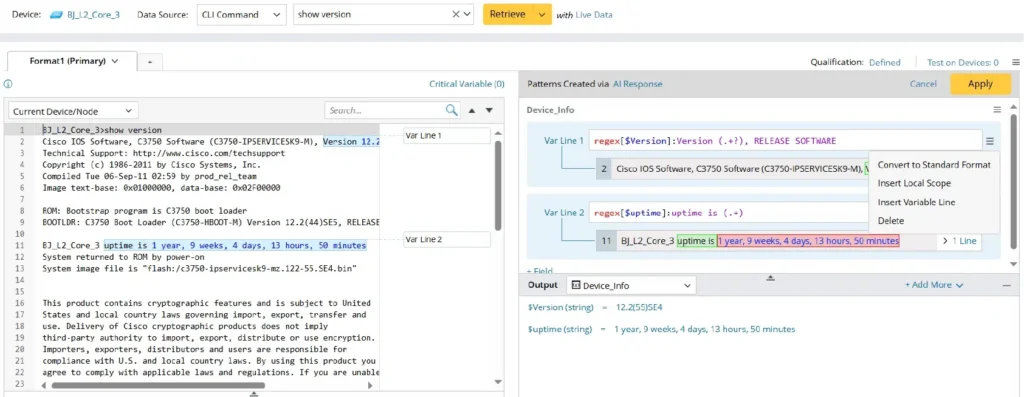
How it works:
Example:
Type show interfaces. Ask for fields like status or CRC errors—AI instantly returns structured data. No regex.
“Get me interface name, status, MTU, and CRC errors.”
AI does the hard part:
It instantly scans the text, finds the patterns, and writes the extraction rules.
You get:
Perfectly structured data in seconds.
| Interface Name | Status | MTU | CRC Errors |
| GigabitEthernet0/1 | up | 1500 | 0 |
The result:
Skip weeks of learning parser coding. The AI builds the automation for you—so your systems can immediately monitor interfaces and trigger alerts.
You don’t need to write regex. You don’t need to learn parser grammar.
Traditional parsing forces you to become a regex expert just to extract data from CLI outputs. AI Parser Assistant eliminates that barrier entirely.
The regex happens behind the scenes. AI translates your prompts into accurate regex patterns, then automatically converts them into standard NetBrain visual parser rules. You never touch the regex unless you want to.
Empower teams to instantly normalize device outputs without relying on specialized parser authors. By enabling consistent, reusable parsing across your organization, you can standardize operational checks, eliminate integration bottlenecks, and rapidly scale automation coverage—all without custom code or vendor dependencies.
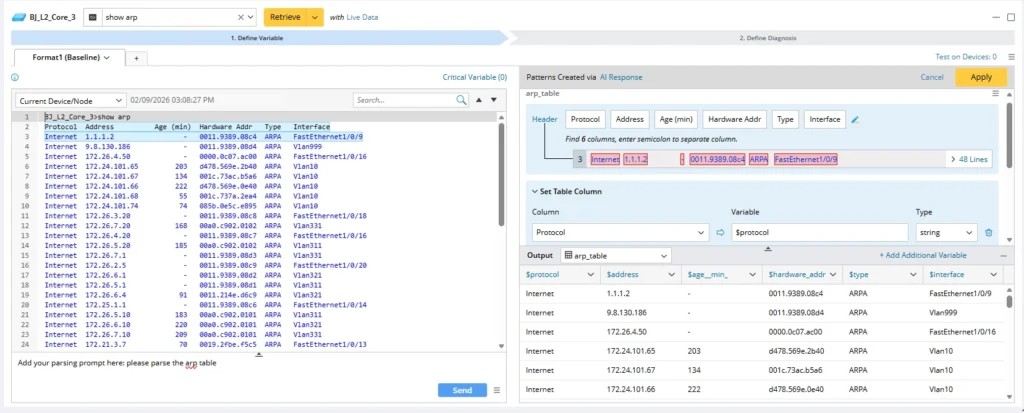
AI Parser Assistant helps teams turn CLI output into automation ready data faster, so more workflows can be automated with less friction and less dependency on niche expertise.











“ Troubleshooting without NetBrain is like troubleshooting in the dark.”
Network Administrator Thomson Reuters