Resolving Unclassified Network Devices

Contents
Unclassified Network Devices refer to the devices with unidentified device types. The system uses the sysObject ID in Vendor Model table to identify the device type. If a device's OID is not available in the Vendor Model table during discovery, the system will take it as an unclassified device. After the discovery, you can check whether there are any unclassified network devices in the Domain Manager.
To resolve these devices, complete the following steps:
1.Log into Domain Management page.
2.In the Domain Management page, select Operations > Domain Manager from the quick access toolbar.
3.In the Domain Manager, select Unclassified Network Devices in the left pane and all unclassified devices are listed.
1)Copy the sysObjectID for the device.
a)Right-click an unclassified device and select Properties.
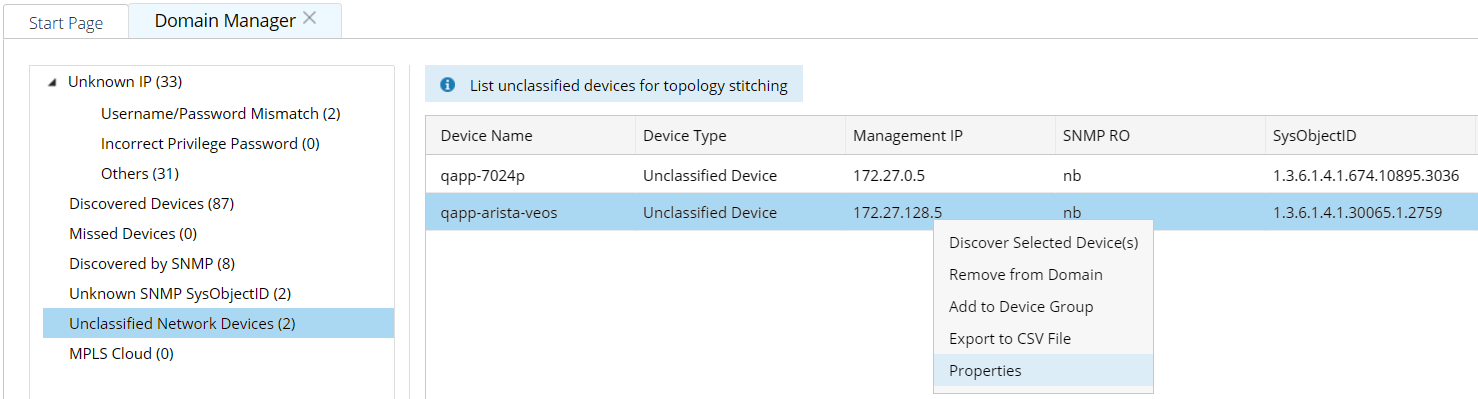
b)In the Properties pane, copy the sysObjectID.
2)Add a device type to the Vendor Model table.
a)Log into Tenant Management page.
b)Select MVS Configuration > Vendor Model, and then click Add.

c)In the Add Vendor Model dialog, paste the sysObjectID, select the correct device type and vendor info, and enter the model info.
d)Enter the OIDs in the CPU OID and Memory OID fields. Leave them empty if you don’t have this information currently.
e)Select the Auto Update check box, and then click Add.
3)Repeat step 1) and 2) to add other unclassified devices if these devices have different models (sysObjectIDs).
Tip: If there are several unclassified devices with the same model (sysObjectID), you only need to add one entry to the Vendor Model table.
4.Select the unclassified devices in the Domain Manager, right-click them and select Discover Selected Devices. The Discover tab page opens and the selected IP addresses are auto-filled in the field.
5.Rediscover the devices. The devices will be recognized with correct device types and models after the discovery is complete.
1)Select Scan IP Range to only discover the specified IPs.
2)Select one access method according to the configuration on your devices.
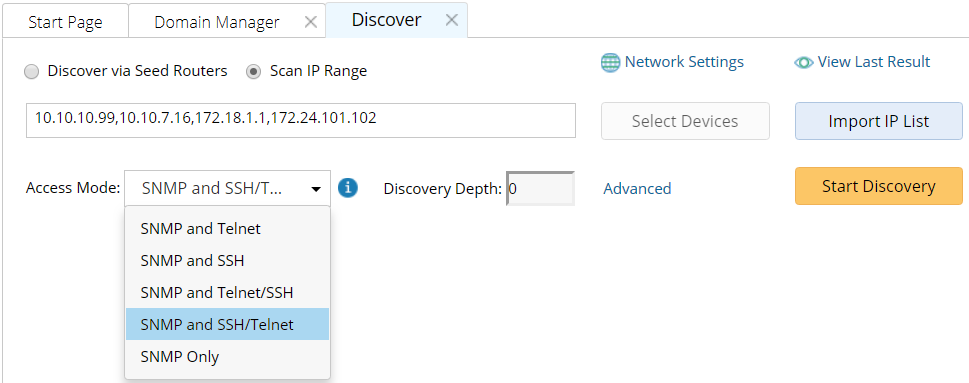
3)Click Network Settings to specify the proxies and credentials to be used in the discovery or keep it as default.
4)Click Start Discovery.
See also: