Create a Path Intent via Intent Template
The Path feature plays a key role in network troubleshooting and automation. Using Path Intent Replication, you can batch-create path intents based on an existing path context. This helps extend the value of intent-based automation in resolving application performance issues and other network problems.
 |
Note: Path intents created through Path Intent Replication cannot be edited. However, you can save them as individual path intents associated with the path. |
Create a Path Intent via Intent Template (without Macro Variables Defined)
- Draw a path map or open an existing path map.
- In the Path Intent tab, click Create Intent > Via Intent Template from the dropdown.
- In the Replicate via Intent Template window, select intent template for path intent replication.
- Click Browse to open the Select Intent Template dialog.
- In the Installed Intent Template type, select the Intnet template you wish to replicate.
- Click OK to replicated new path intent.
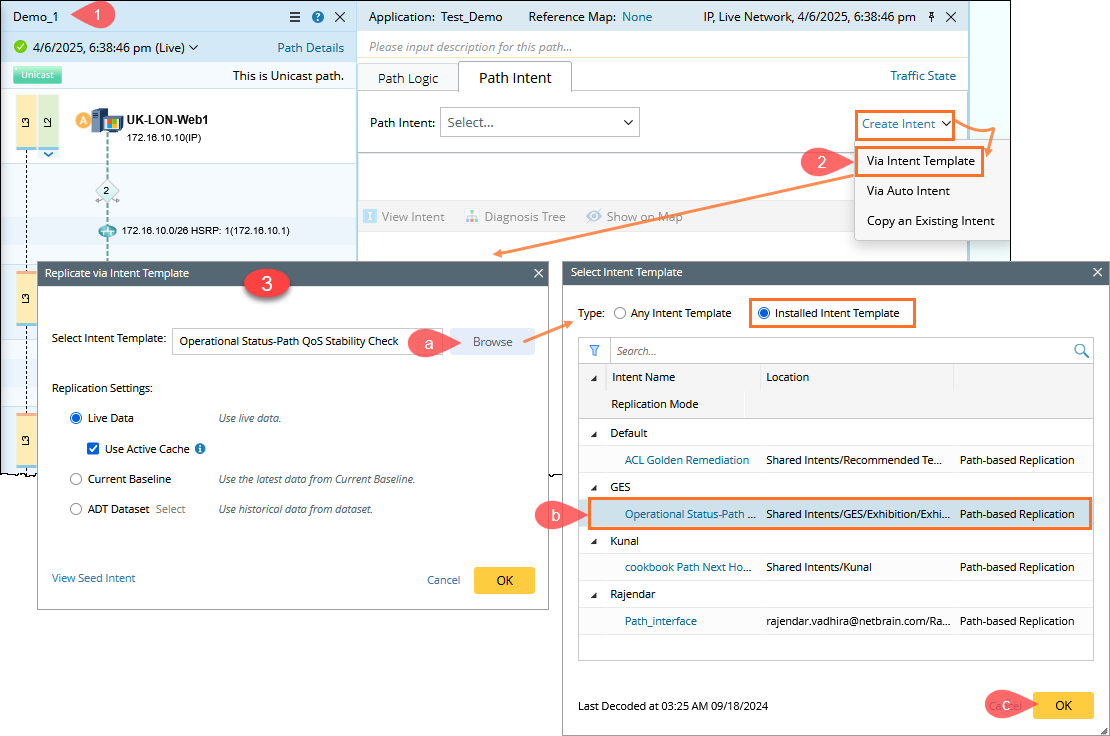
(Optional) Click View Seed Intent to preview seed intent, which may help you select proper intent template. You can also define the replication settings if needed.
Create a Path Intent via Intent Template (with Macro Variables Defined)
- On the Path Intent tab, click Create Intent and select Via Intent Template.
- In the Replicate via Intent Template window, select intent template for path intent replication.
- Click Browse and select the intent template in the Select Network Intent Template dialog. Then click OK in the Select Network Intent Template dialog.
- Click View Seed Intent to preview seed intent, which may help you select proper intent template.
You can also define the replication settings to see the Input Value option. - Configure macro variables for replicating intent in the NI Replication Settings. For more information, see Define Macro Variable in Network Intent.
- Enable the Input Value, then input proper macro variable for the intent template.
- Click OK. New path intent will be replicated after a while.

- View the created path intent from the Path intent drop-list, and after selecting a path intent, the intent details will be displayed in the Path Intent pane.

Create Path Intent for Application Path in ADT
Intent Replication for Path in ADT allows you to schedule and replicate path intents using available data. You can add a group column to ADT using the Intent Replication for Path method. This method supports data fields such as the path intent and its associated details. With this data, you can define variables to configure path intent replication. The resulting intents can then be saved as reusable path intents.
For more information, see Create Path Intent for Application Path in ADT.