Configuring Live Access Advanced Settings

Contents
In the Advanced Settings, you can configure the following information related to live access:
▪Network Security (such as hide sensitive data in configuration)
▪Network Credentials Settings for Change Management Module
▪Management Interface Selection Order
▪Maximum Routing Table Entries
▪LAN Mask Settings for L2 Topology Building
Proceed with the following steps to configure the advanced settings:
1.Log in to the Domain Management page.
2.In the Domain Management page, click Operations > Domain Settings > Advanced Settings from the quick access toolbar.
3.On the Advanced Settings tab, configure the following live access settings based on your needs and click Submit.
Select the check box to display the listed sensitive data in the configuration file of each device as ciphertexts to protect them from being exposed. It is selected by default. Note: Any changes to the settings will take effect from the next discovery and benchmark task. |
|---|
Specify the minimum bits of the subnet mask of LANs for building the Layer 2 topology. The LANs of which subnet mask bits are smaller than the minimum value will not be used in L2 topology calculation. The default value is 16. Note: Any changes to the settings will take effect from the next L2 topology calculation. |
|---|
Specify to use the private or shared credentials for SSH/Telnet CLI access and network change management. ▪Use private credential and shared privilege credential (default option) — use credentials defined in the Private CLI Settings to log in to devices and then use privilege credentials defined in the Shared Device Settings to enter privileged mode. ▪Use private credential and private privilege credential — use credentials in the Private CLI Settings to log in to devices and then use privilege credentials defined in the Private Device Settings to enter privileged mode. ▪Use shared credential and shared privilege credential — use credentials defined in the Shared Device Settings to log in to devices and then use privilege credentials defined in the Shared Device Settings to enter privileged mode. |
Specify the maximum time to wait for the Front Server to retrieve live data from devices. Adjust the timeout settings based on your network state. If your network is not unstable or slow, configure a larger timeout value. ▪SNMP — specify the maximum time for the Front Server to monitor, discover live paths, retrieve ARP/MAC tables, and obtain interface indexes by SNMP. The default value is 2 seconds. ▪CLI — specify the maximum time for the Front Server to retrieve route/ARP/MAC tables, configuration files, and other data by Telnet/SSH. The default value is 30 seconds. Note: Any changes to the settings will take effect from the next discovery and benchmark task. |
|---|
The system uses hostname as a unique identification of a device. There are two ways to get the hostname, from SNMP or CLI (use Telnet/SSH to get the full configuration). But SNMP hostnames will include domain names or other strings with dots. You can set how to trim SNMP hostnames by using the following options. Note: Any changes to the following settings will take effect from the next discovery and benchmark task. ▪Trim all strings after dot in SNMP hostname (default option) — select this option to trim the SNMP hostname after the first dot. For example, if the SNMP hostname is "router.netbrain.tech.com", it will be parsed into "router". ▪Trim following domain names from SNMP hostname — select this option to trim the string that you entered from the SNMP hostname. For example, if you enter the ".tech.com" string in the lower field, the "router.netbrain.tech.com" string is parsed into "router.netbrain". Tip: Use || as the separation character for multiple strings. Press the Enter key on your keyboard to wrap text to the next line. |
 Management Interface Selection Order
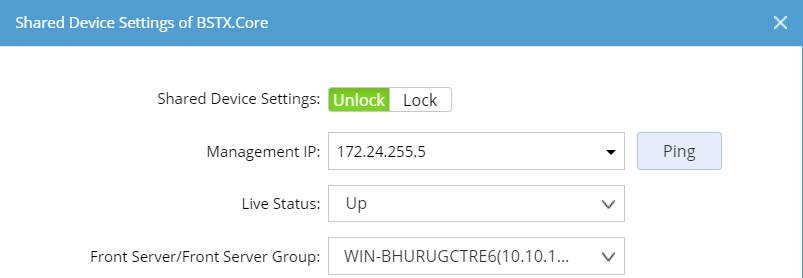
When the system retrieves live data for a device, it accesses the device through its management IP address in the Shared Device Settings. The interface configured with the management IP address is the management interface. In the tuning live access process, the system can reset the management IP address by following the management interface selection order. By default, the order is management > Loopback > vlan > ve > ethernet. You can modify the order based on your network situation, and then click Apply. Note: The management IP addresses of all devices in the domain will change immediately if they are not locked in the Shared Device Settings. |
Adjust the order based on whether Jumpbox is used in your network to improve the efficiency of live access process. ▪Trying to login device directly, then login via Jumpbox (default option) — log in to the device by the Front Server directly. If the login fails, the Front Server will attempt to connect to the Jumpbox to log in to the device. ▪Trying to login device via Jumpbox, then login directly — the Front Server attempts to connect to the Jumpbox to log in to a device. If the login fails, the Front Server will attempt to log in to the device directly. Specify the next action that the system will perform if Ping fails. ▪If ping fails, don't try Telnet/SSH in Tune Live Access and Seed Discovery (selected by default) — disable using the Telnet/SSH method to access a device in tuning live access or seed discovery when ping fails. ▪If ping fails, don't try SNMP/Telnet/SSH in Scan IP Range (selected by default) — disable using the SNMP/Telnet/SSH method to access a device in scanning IP range when ping fails. Note: Any changes to the settings will take effect from the next discovery and tune live access. |
Customize the threshold of routing entries to retrieve the route table of a device in a discovery or benchmark task. If the total entries exceed the threshold, the route table will not be retrieved. The default value is 100000. Note: Any changes to the settings will take effect from the next discovery or benchmark task. |