R12 Publication-2025July16
Run and View Path Intent Details
After creating a path intent, you can run the intent and view the results in the Path Intent pane. All the path intents added to the path are listed in the Path Intent list. You can select one and its intent details will be displayed in the Path Intent pane.
Run Path NI and View Execution Results in the Path NI Pane
You can click Run to run the Path Intent in the Path NI pane, and the intent details and execution results will be displayed. The path intent can be run more than once.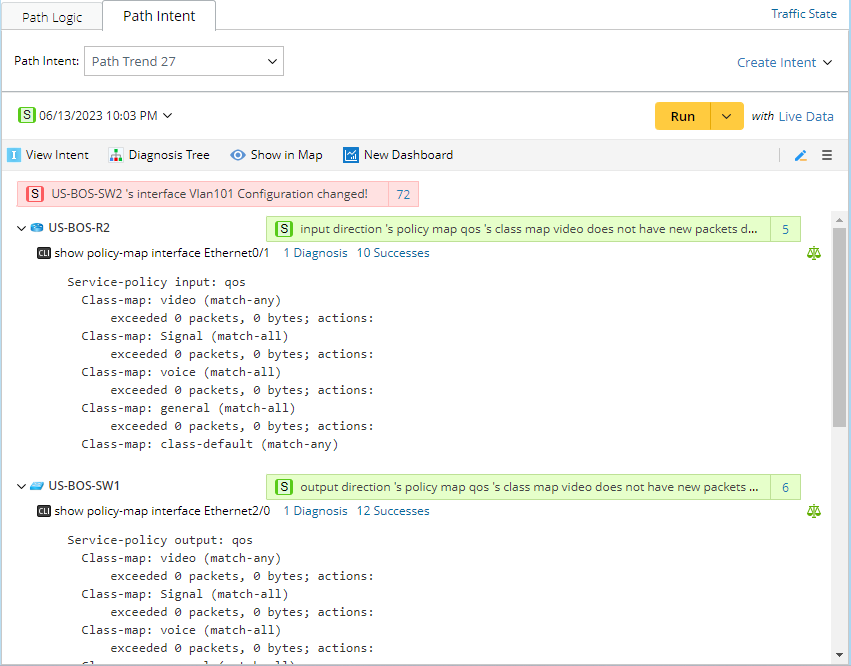

|
Note: Define the settings for executing the path intent by clicking Run Settings from the Hamburger Menu. |
- Summaries of the devices of the path intent and the diagnoses are intuitively displayed.
- The summaries of the CLI command diagnosis and the generated alerts are displayed in each command section.
- The CLI command is fully displayed.
- All device sections of a path intent are displayed. The path hop device will also be fully displayed.
The Diagnosis Tree can be opened from the Path Intent pane (click the  icon) to present the execution results.