Verify Application
You can use a Verify Application node in a Runbook to monitor and validate application paths across the network. When changes are detected, you can trigger automated actions such as Qapps, CLI commands, or other automations for further diagnosis.
Steps to Verify Application Paths and Troubleshoot Changes:
- Open a Runbook from the map.
-
Add a Verify Application node using the Add Node dialog.

-
Configure Application Paths:
In the Verify Application node, click +Add Path and add the required application paths that you want to monitor. These paths represent critical network flows that should remain consistent.
-
Run Verification:
Click Run to start the verification process. The system calculates and validates the current state of each configured application path.

-
Review and Respond to Changes:
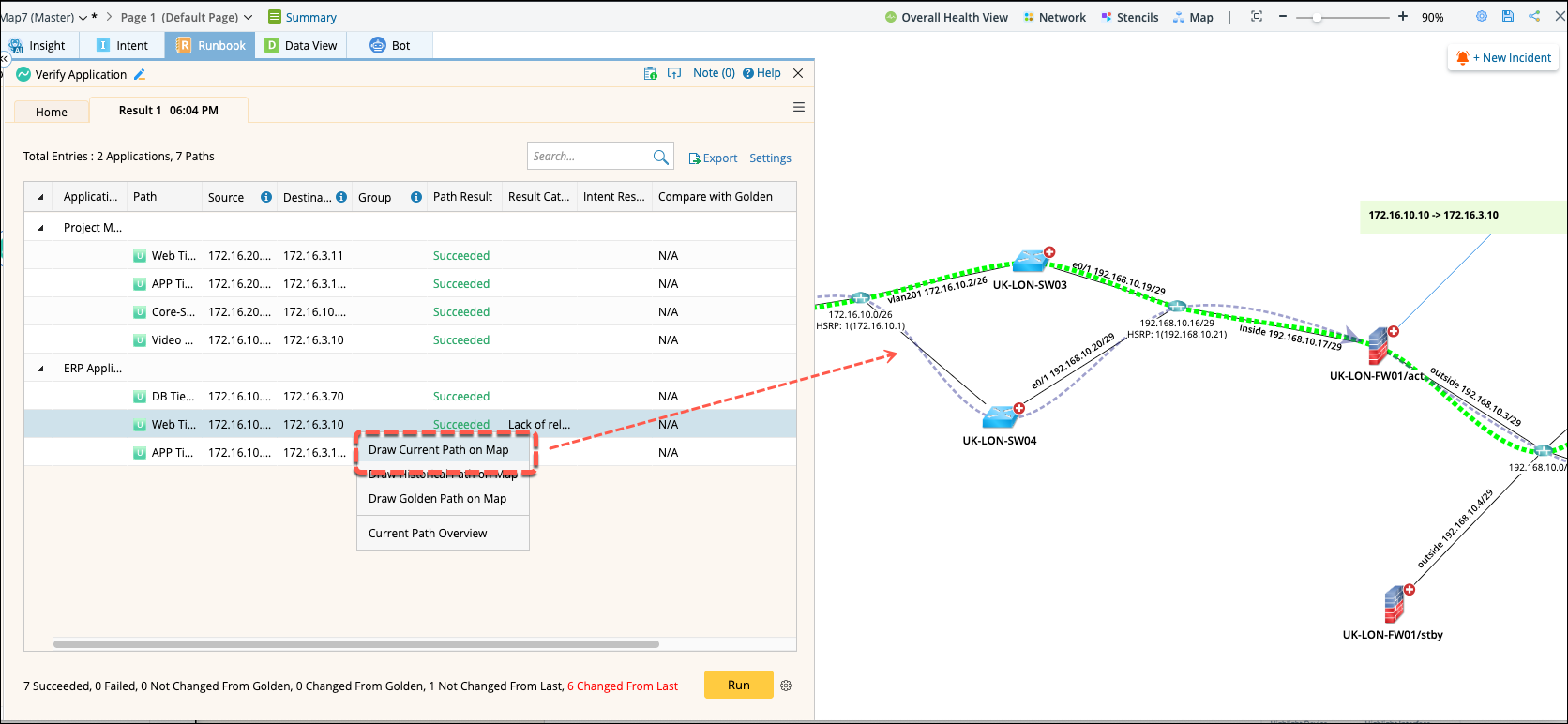
If path changes are detected, right-click the changed path and select Draw Path to visualize it on the map.
-
Add Automation Actions: To add Qapp Overall Health Monitor or other automation tasks to respond to or troubleshoot path changes.
- Select a path on the map and click to open the options to add automation nodes (e.g., Monitor/Run Qapp).
- Click Monitor and the node Overall Health Monitor will be added to the Runbook.
- Execute the node and results will appear on the map.

Tip: This feature helps proactively monitor network paths critical to applications and quickly respond to deviations or issues through automation. 
View the data overlay on the map and check the detailed results in the Output Console.