R12.1 Project Publication-2025Dec23
Customize Macro Variables for Intent Template and Path Intent Template in Auto Intent
Auto Intent supports replicating the intent template (which is decoded on-demand) with customizable macro variables. With this functionality, end users can replicate desired intent from an intent template by configuring the macro variables. Both normal intent template and path intent template can have macro variables defined.
 | Note: A macro variable is often used in a CLI command in network intent, e.g., show ip route $destination-ip-address. You can enter different destination ip addresses when troubleshooting network issues of different application paths. |

If the intent already has macro variables defined, it will be labeled "Input Required", and you can change the value, which will affect the replication results.
To configure macro variables for intent template (the intent template matched with the selected devices), follow the steps below:
- Select the intent template (decoded on-demand) with macro variables configured, then the macro variables for this intent template will be displayed in the Input Macro Variable Area.
- To change the macro variable value, you can directly select the defined value of the macro variables from the drop-down list.
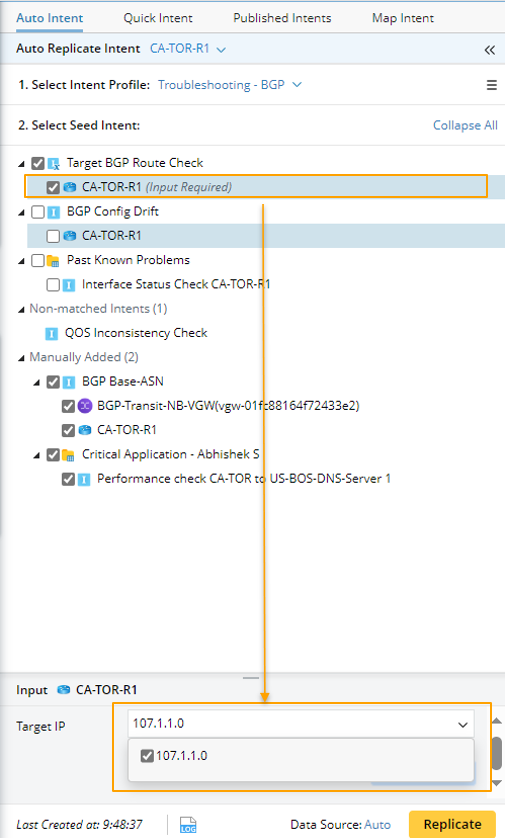
Alternatively, you can deselect the pre-defined values from the drop-down list then input the new macro variable value or several macro variable values separated by comma, for example set the value of the macro variable Target IP to "107.1.0.1".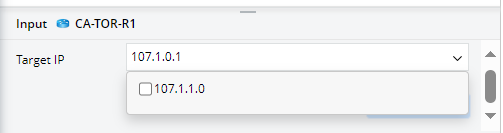

Note: If you are customizing macro variables for path intent template, the candidate value of path macro variable is the value configured in Path NIT replication logic. 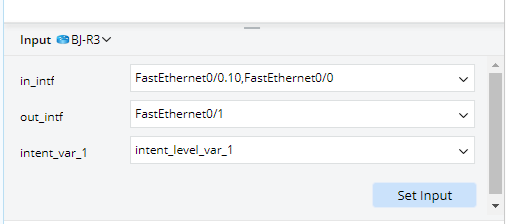
- Click Set Input. The value of macro variable will be customized. The Set Input button will be disabled until you check the checkbox of an intent.
- Repeat steps 2-3 to customize more macro variables as needed.
After these settings, as you click Replicate, the system will replicate a new intent on the qualified devices in the selected intent template, using the configured macro variable values in the device's command section.