Configuring Do-Not-Scan Criteria
- Log in to the Domain Management page.
-
Click the
 icon in the upper-left corner of the page and select Do-Not-Scan.

IP or Subnet Tab
Use this tab to exclude devices based on IP addresses or subnet ranges. To Add an IP or Subnet:
- Click + Add.
- Enter the IP Address and Subnet Mask you want to exclude.
- Optionally, add a description.
- Source Technology is auto-set to All Technologies.
-
Click OK to add an entry.

Additional Operations:
- The Search function is supported in the IP or Subnet column to help you locate entries quickly.
-
Click
 Import to upload a IP list in .csv format, or click
  Export to download the Do-Not-Scan IP list.
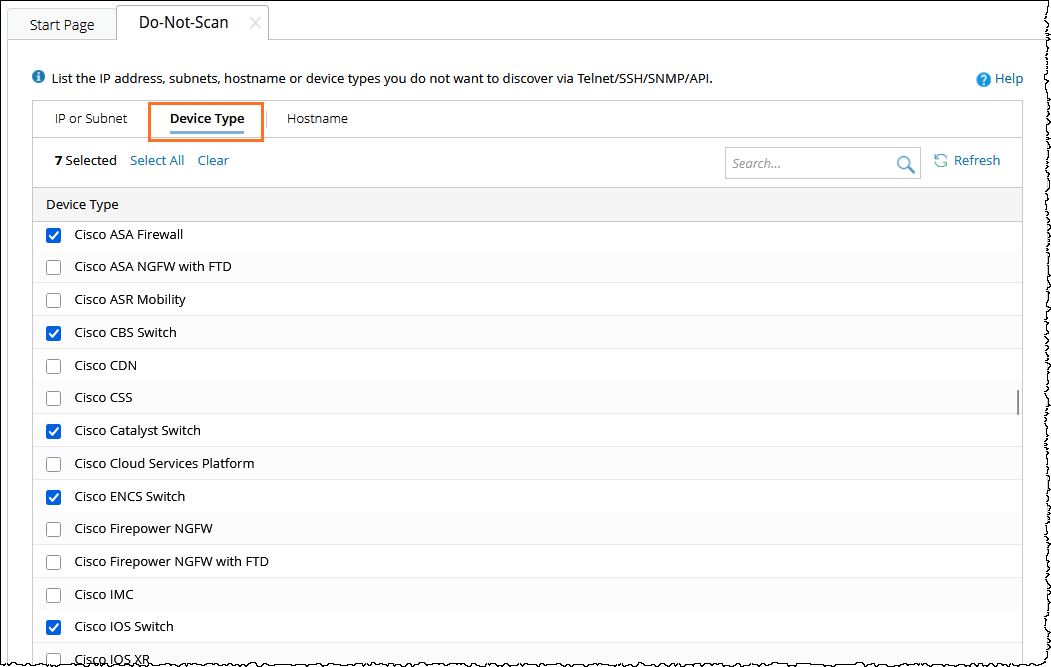
Device Type Tab
To exclude specific device types from discovery, select their check boxes in the list. You can use the Search function in the Device Type column to quickly locate device types.
Hostname Tab
Use this tab to exclude devices based on hostname patterns. To Add a Hostname Rule:
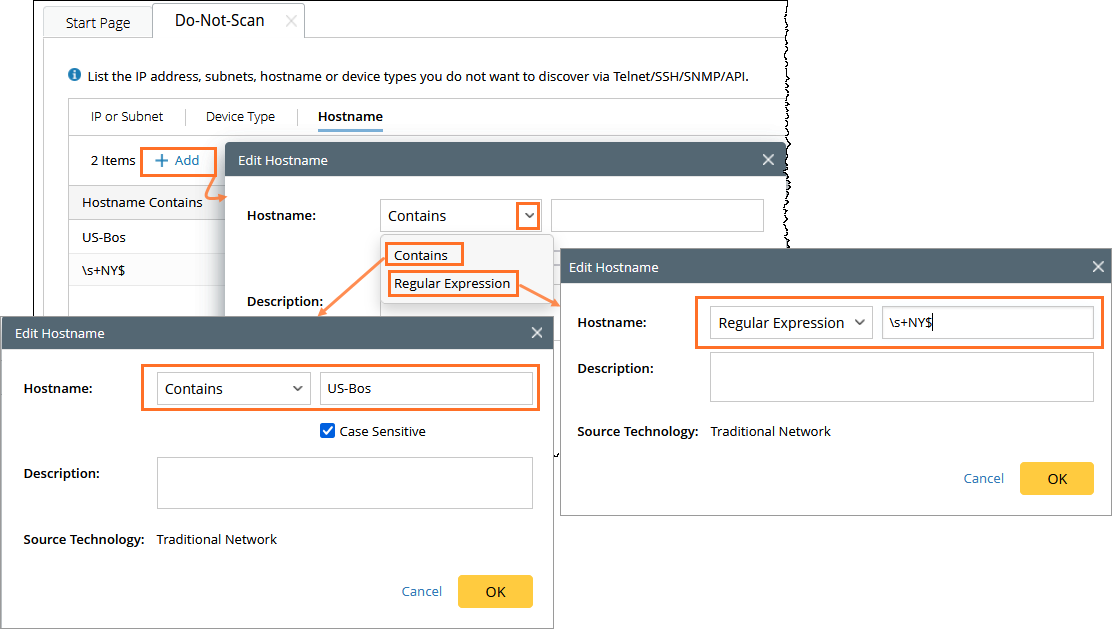
- Click + Add.
-
Select either of the Hostname match type:
- Contains: Matches if the hostname includes a keyword (case sensitive optional).
- Regular Expression: Use regex patterns (case sensitivity must be defined in the pattern).
- Enter the hostname pattern.
- Optionally, add a description.
- Source Technology is auto-set to Traditional Network.
- Click OK to add an entry.
- The Search function is used in the Hostname column to help you locate entries quickly.
-
Click Import to upload a hostname list in .csv format, or click Export to download the Do-Not-Scan list.
Discovery Logic
The system checks Do-Not-Scan hostname rules before completing discovery or rediscovery. If a device’s hostname matches a defined Do-Not-Scan hostname rule, the system stops the discovery process for that device and records a log message like the following:
Since the hostname "$hostname" matches the Do-not-Scan hostname criteria "US-BOS", the discovery process has been terminated for this device. This logic:
- Applies only to hostname rules.
- Not applied to Benchmark scans or Tune Live Access.
- Applies hostname matching only after SNMP trimming is complete.
Permissions
- Read actions require domain access.
- Add, delete, modify, or import actions require shared resource permissions and are recorded in the audit log.
Best Practices
- Use Hostname rules when names are consistent but IPs vary.
- Use IP or Subnet for fixed network ranges.
- Use Device Type to exclude device categories.
- Export your rules regularly for backup or review.
See also: