R11.0a-March2023
View Diagnosis Tree (Pre-Execution)
After Follow-up NIs are defined, you can browse the Diagnosis Tree (Pre-Execution) of home NI to view the entire multi-staging diagnosis design, which consists of :
- Home NI
- All NI Diagnosis
- All Follow-up Intents
- Go back to the NI Edit Mode and click Diagnosis Tree to open it.

- You can only view the Diagnosis Tree in Pre-Execution mode before the Follow-up diagnosis is executed.
- View the description and message you defined in Follow-up NI.
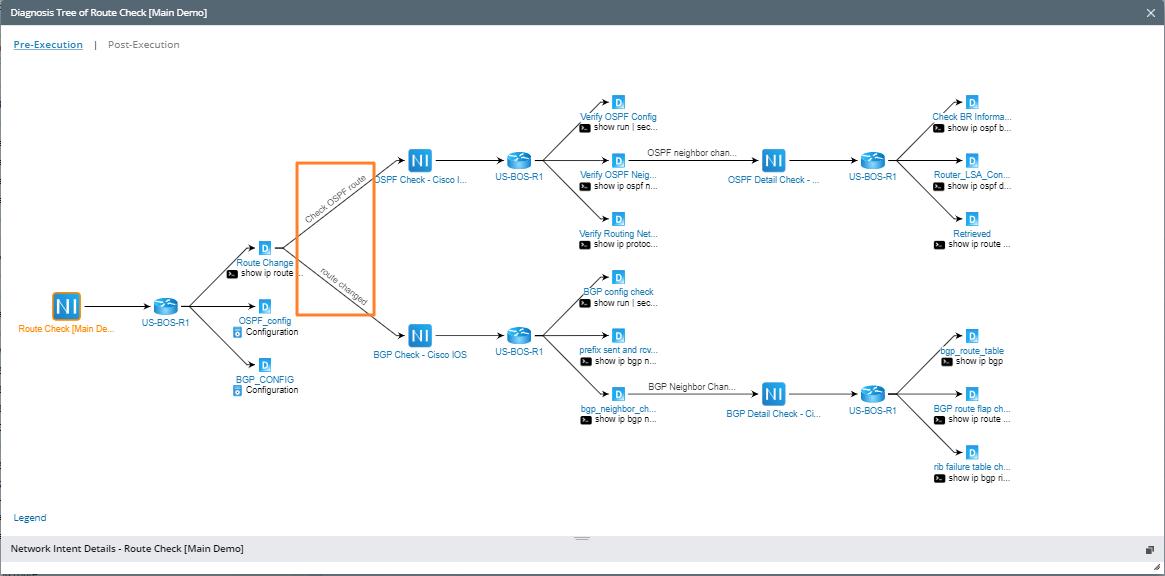
Display Logic of the Diagnosis Tree (Pre-Execution)
The display logic of the Diagnosis Tree (Pre-Execution) is as follows:
- An NI can have multiple diagnoses, and each Diagnosis generates a diagnosis node. These diagnosis nodes are always displayed regardless of whether the follow-up NI is defined in the Diagnosis.
- Follow-up NIs or Stop nodes defined in each Diagnosis are displayed in parallel on different branches.
- You can drag the selected node and zoom in/out to view the tree.
- The Post-Execution mode is not available before this NI is executed.