R12 Publication-2025July16
Modify Guidebook
Functions related to Guidebook Modification:
Edit Hypothesis
-
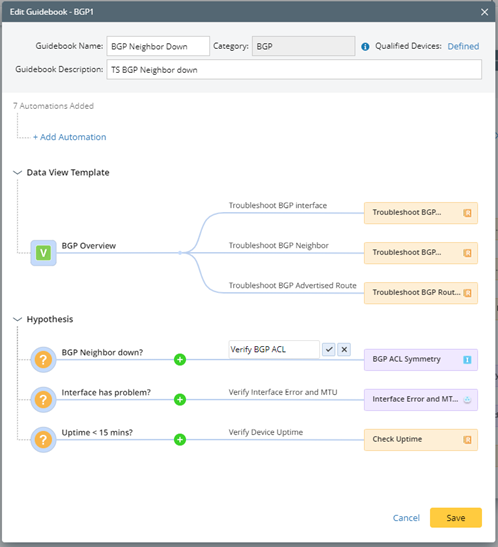
In Create Guidebook or Edit Guidebook interface, mouse over a Hypothesis.

-
Click
 , then you can modify the hypothesis.

Remove Hypothesis
-
In Create Guidebook or Edit Guidebook interface, mouse over a Hypothesis and click
 .
.

-
Click Remove in the Warning window.

Note: The Hypothesis and its associated Runbook Template/Network Intent will be deleted from this Guidebook.
Modify Note
-
In Create Guidebook or Edit Guidebook interface, mouse over the note and click .

-
Edit the note inline.
Remove Runbook Template, Network Intent and Network Intent Cluster
The Runbook Template, Network Intent and Network Intent Cluster associated with the hypothesis can be removed from a Guidebook.
-
In Create Guidebook or Edit Guidebook interface, mouse over a Runbook Template/Network Intent/Network Intent Cluster, and click .

-
Click Remove in the Warning pop-up window. The Runbook Template, Network Intent or Network Intent Cluster will be removed from this Guidebook.

Remove Data View Template
-
In Create Guidebook or Edit Guidebook interface, mouse over the Data View Template, and click .

-
Click Remove in the Warning pop-up window.

Note: The Data View Template and its respective Runbook Template/Network Intent will be deleted from this Guidebook.

