R12 Publication-2025July16
Define Table Settings of ADT View
Under the Table tab, define what data will be shown in the table structure of the ADT view.
- Select Columns: Check the corresponding checkbox to choose ADT columns in the original table. The selected columns will be shown in the table structure of a view. Search function is available to find desired columns by column name, tag, and column group name.
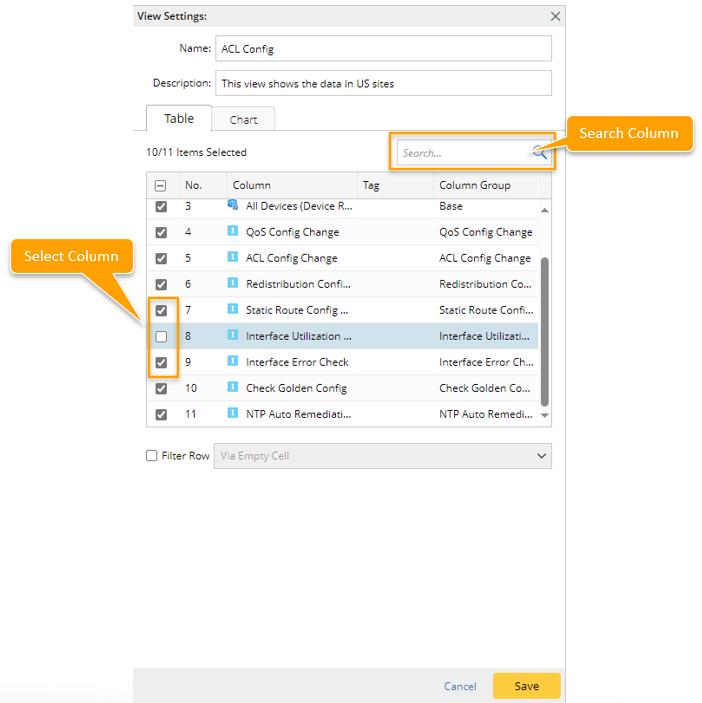

Note: The total number of selected columns is limited to 20. - Filter Row: Check the checkbox next to Filter Row to enable this function (this function is disabled by default), then you can define which rows will be shown in ADT view by the following two methods.
- Filter row Via Empty Cell: Via Empty Cell is the default option. Then, you can select intent columns. A row will be excluded if all the cells of the selected intent columns in this row are empty.

- Filter row By Advanced Filter: Define the conditions for filtering rows, then the rows meetings these conditions will be found. For example, to define Condition A, select All Devices (Device Role) column, select operator Contains, then type the match word 'DE'. With this Condition A, a role with the device role name containing 'DE' will be found and displayed in ADT view.
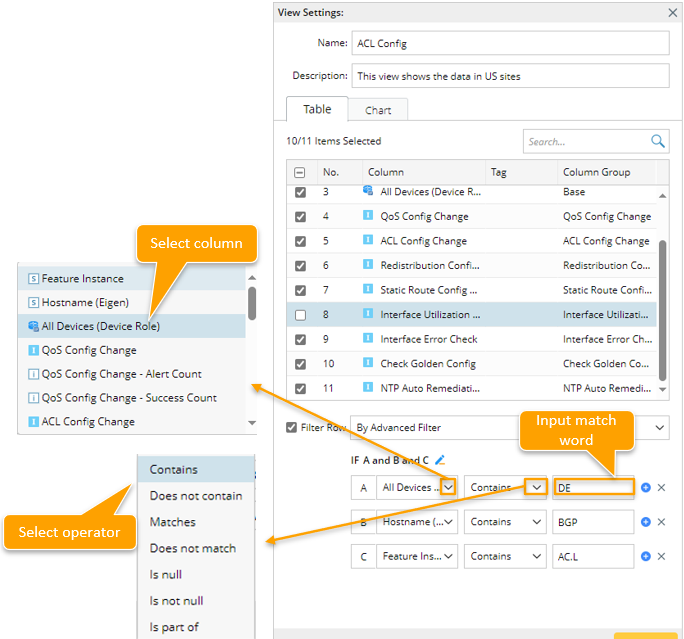
Click the icon to add a condition.
Click the icon to delete a condition.
Click the icon to edit the relationship between conditions.
- Filter row Via Empty Cell: Via Empty Cell is the default option. Then, you can select intent columns. A row will be excluded if all the cells of the selected intent columns in this row are empty.
The following table lists the column data type and the corresponding available operators.
| No. | Column Data Type | Operator |
| 1 |
|
|
| 2 |
|
|
| 3 |
|
|
| 4 |
|
|
|
|
Note: Rows that are manually added to the original ADT can be shown in ADT view. |