R12.1 Project Publication-2025Dec23
Set Up API Server

|
Note: Before setting up your API server, read NetBrain-Requirements for API Server Setup first. |
Follow these steps to set up a NetBrain GCP API Server:
- Log in to your NetBrain System.
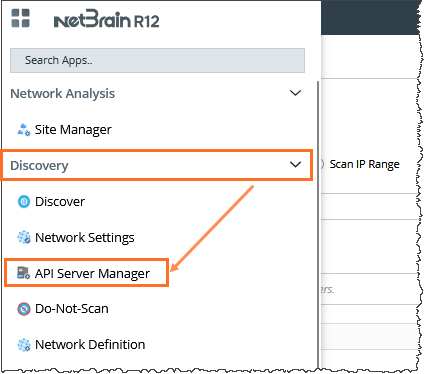
- In the Domain Management page, navigate to Discovery > API Server Manager.
- In the API Server Manager configuration page, click Add API Server to add an API Server entry into the table for each account to be monitored.
- Set up the GCP API Server via Service Account.
Add External API Server configuration using the following information.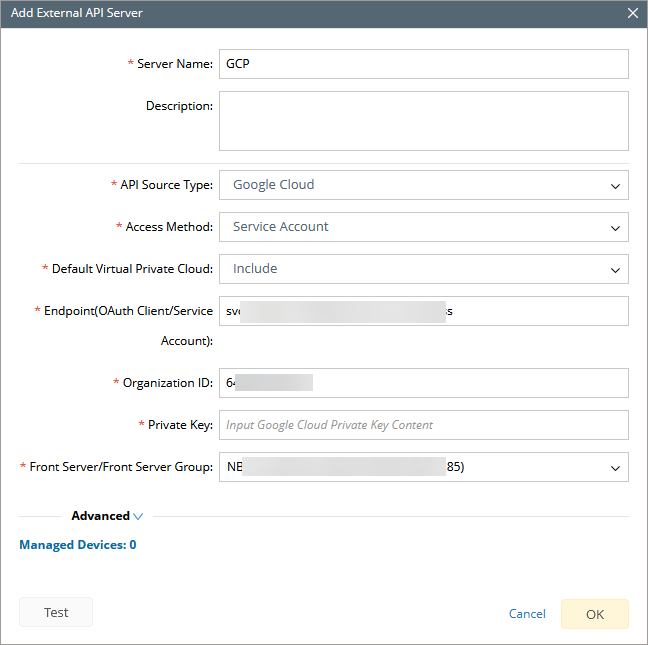
- Server Name: a unique name.
- Description: an optional field to describe this server.
- API Source Type: select Google Cloud.
- Access Method: select Service Account.
- Endpoint: service account in email format just created. See step 2 of section Create Service Account.
- Organization ID: your actual GCP Organization ID.
- Private Key: key value. See step 6 of section Create Service Account. You can copy it from the downloaded JSON file.
- Front Server: select one front server which can access GCP.
- Click Test to verify that NetBrain system has access to the GCP account resources. If it fails, check whether the roles and policies are configured properly.
Note: If you have any issues while setting up an API server, contact NetBrain Support.