R12.1 Project Publication-2025Dec23
CLI Template
The system provides several built-in CLI templates to help you quickly add multiple CLI commands to your tasks. You can also create custom templates tailored to your needs.
Within each template, you can define qualifications such as applicable device types for individual CLI commands. When a CLI template is loaded into a task (e.g., Runbook, Benchmark, etc.), the system uses these qualifications to automatically filter out commands that are not applicable to the target devices.
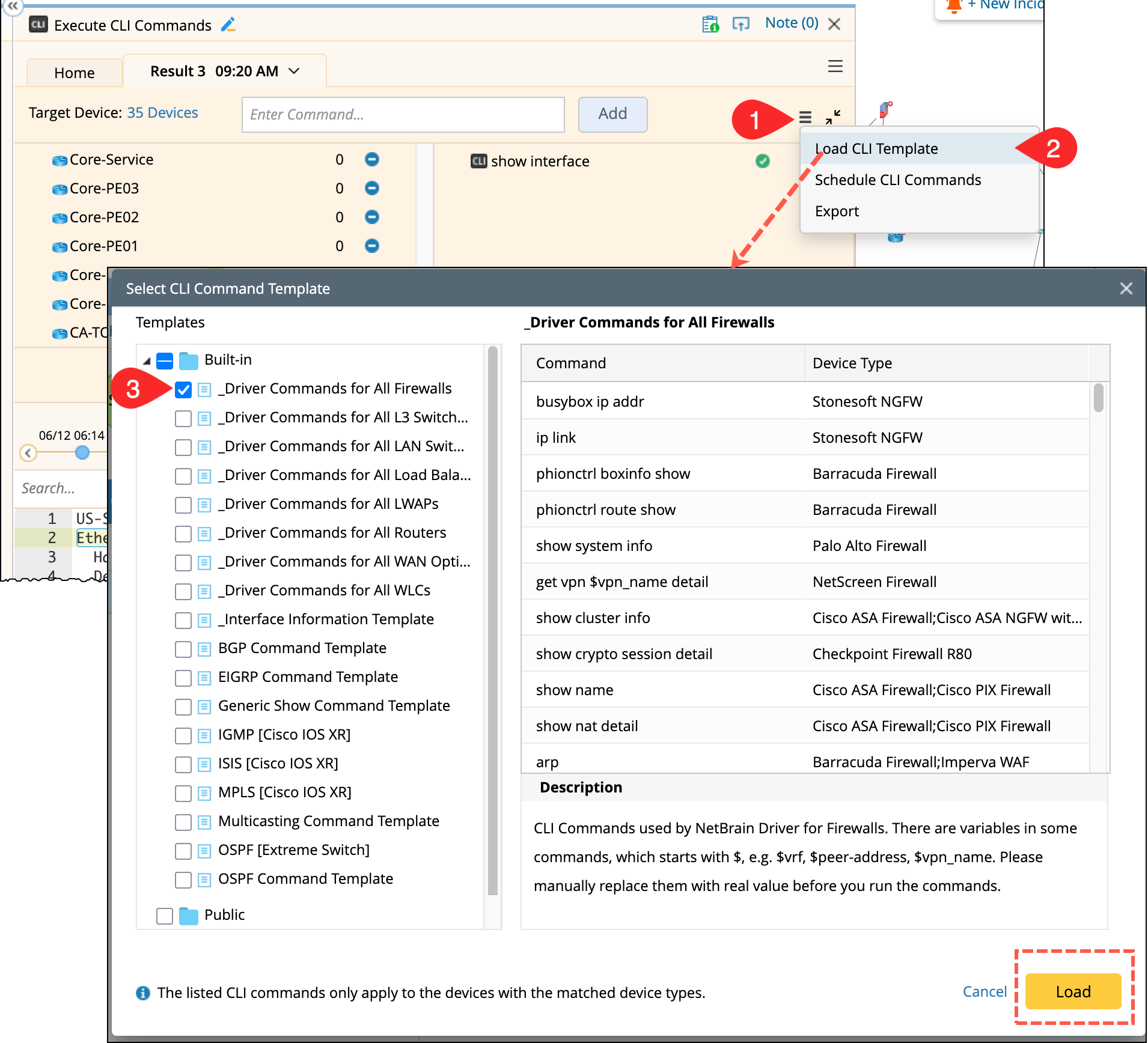
Accessing CLI Templates: You can access CLI templates in the following way:
-
From Execute CLI Node pane in the Runbook, open
 menu located next to Target Devices.
 - Select Load CLI Template to open the corresponding dialog.
- Choose a built-in batch template and click Load.

|
Note: You can add different device types for a single CLI command across multiple templates. When you add duplicate commands by loading templates into a task, the device types defined in different templates will be combined.
|
|
|
Tip: Templates in the Built-in folder are maintained by NetBrain through Knowledge Cloud and are regularly updated to reflect best practices. |