R12.1 JA-2025July15
Amazon AWS
This chapter introduces how to troubleshoot AWS networks.
Scenario 1: AWS Discovery Failed
There are different reasons for live retrieval failure.
Duplicate API servers exist
Description
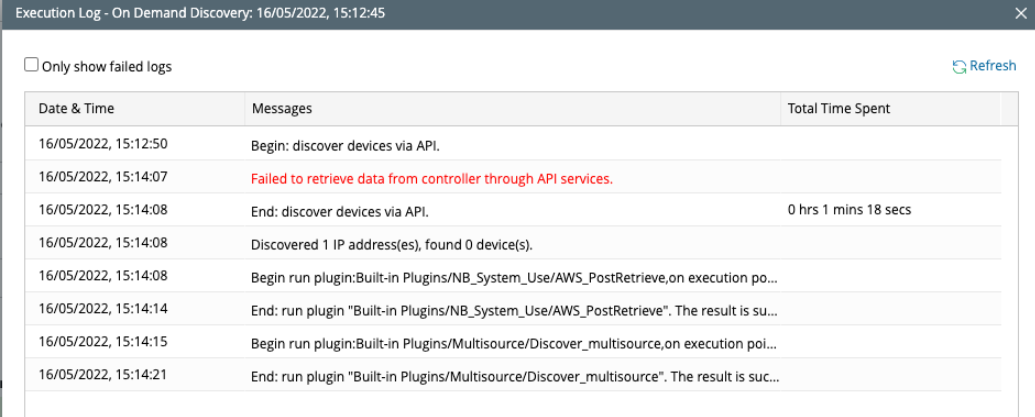
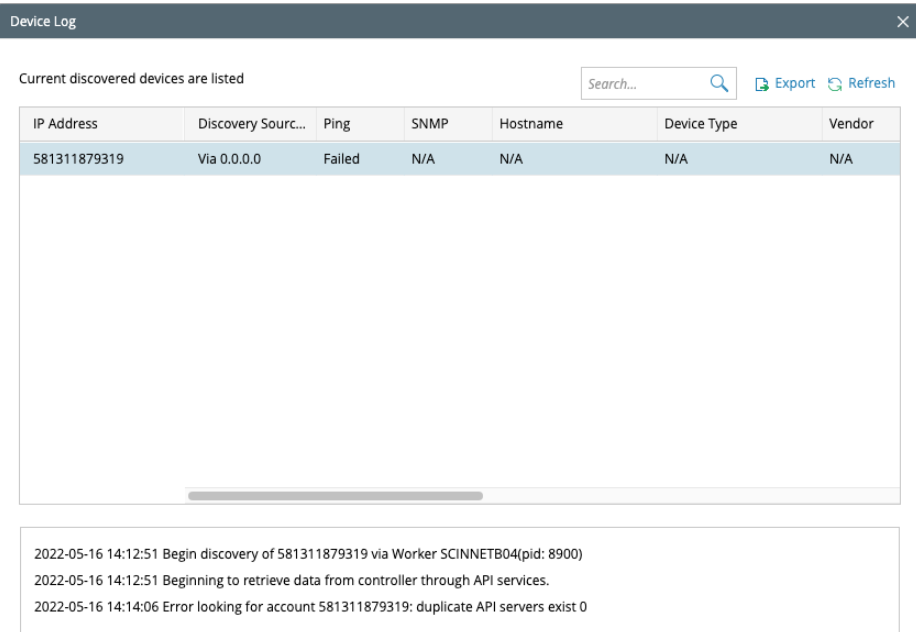
The AWS device discovery fails due to duplicate API servers. That is, the API server’s settings cannot have more than one entry for the same AWS account. This error message is generated when more than one API server is added for a single AWS account.

- Check the execution log of the discovery. You may encounter this error while discovering the AWS nodes in NetworkBrain.
- Check the device log to find more details about the error as below:
- Remove the additional API server for the AWS account and ensure that only one API server details are added under the discovery tab.
- If the script-related issue persists, contact the NetBrain Platform and DEV team.
- Collect Data
- Collect the Discovery Execution Logs to verify whether the discovery passed or failed. These logs are available under the discovery tab after the discovery is performed.
- Collect the Discovery Device Logs to verify the details of the failure. These logs are available under the discovery tab after the discovery is performed.
Sample Case
- SF case 142839: https://nbtech.lightning.force.com/lightning/r/Case/5008Z00001uU1vSQAS/view
- Error messages:
- Root cause: In this case, the issue was still present after removing the additional account, so the techspec script was verified. The issue was with the querying of the DB for external server data in the script which is different for v10.0 and v10.1.
- Solution: The script has been added in the latest patch of the main release v0.0.31, so, another customized patch was released to the customer that removes the script from the customized repo and triggers the script from the main version to take effect.