Other Operations in Incident Dictionary

Contents
Some additional operations are offered in Incident Dictionary to help with the creation and management of Hash Tags:
• Export Hash Tags
The existing Hash Tags can be exported by clicking on Export. In the popup window, all system generated and manually created Hash Tags are listed to be selected. The exported Hash Tags file is CSV formatted.
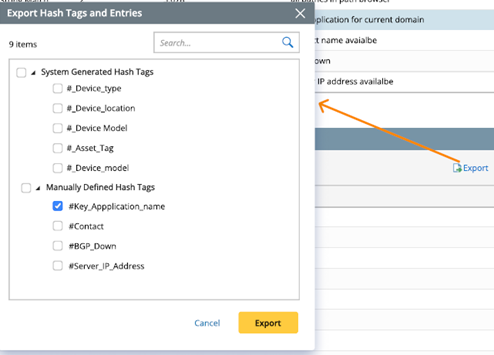
The single Hash Tag can also be exported by clicking on Export on the Hash Tag detail pane.

• Import Hash Tags
The exported Hash Tag files can be imported into the system. Only Manually Created Hash Tags can be imported into the system.

• ‘Save As’ Option
Right-click on a Hash Tag and select Save As to duplicate this Hash Tag. For system generated Hash Tags, only the name and value for Primary Tag will be copied. The Tag Type of the new tag becomes Manually Created; for manually created Hash Tags, the names and values of Primary Tags Associated Tags will be copied.

• Hash Tag Settings
Clicking on the  icon can view and modify the JSON file for matching logic of Incident Dictionary.
