Managing the Incident Type

Contents
1.Click  and select Intent-Based Triggered Automation.
2.Click the Incident Type tag.
3.Select an Incident Type, click  .
.
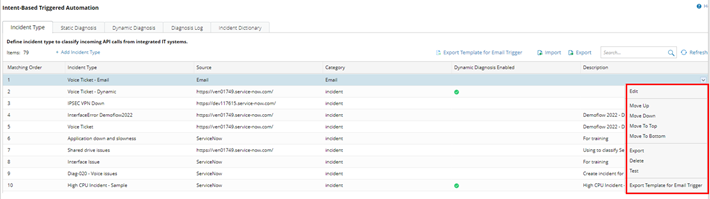
You can:
• Edit, delete and test this incident type.
• Export this incident type to a local file.
• Move this incident type up, down, to top, and to bottom.
Note: The system will match an incoming API call to Incident Types according to the order.
oTo export all Incident Types, click  .
.
oTo import Integrated IT systems from a file, click  > click Add Incident Type … > select a local file in the pop-up window.