Hash Tag

Contents
Hash Tags are sets of pre-defined tags, such as #device_name or #interface_ip, used to classify the Incidents and trigger the Dynamic Diagnosis.
A Hash Tag has seven properties:
• Name and Description: The Hash Tag name must be unique and start with #, followed by letters, numbers, and underscore (_).
• Type: The Hash Tags can be manually created by end-users or generated by the system. The system generated Hash Tags start with a number sign and underscore ‘#_’ to distinguish from the manually created Hash Tags, such as #_device. The Primary Tag of system generated Hash Tags cannot be modified, but end-users can customize the Associated Tags. See Appendix for the list of system generated Hash Tags.
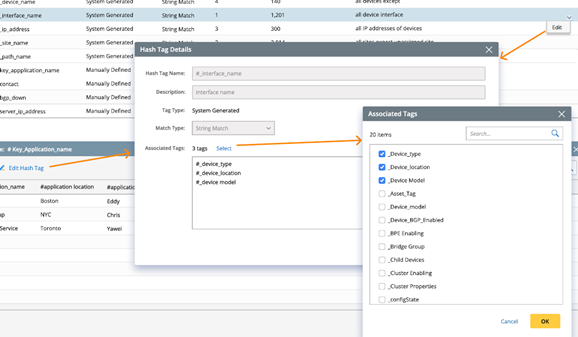
• Primary Tag : A Hash Tag can only have one Primary Tag. Hash Tag entry lookup is based on Primary Tag only.
• Associated Tag(s): Associated Tags help provide additional information, and a Hash Tag can have multiple Associated Tags. They will not affect the matching between Incident Type and installed NICs. They are used to filter the member NIs of the installed NIC. Within each Hash Tag, the name of the Associated Tag must be unique.
• Match Type: There are three types of match methods:
➢String Match: The values of the Hash Tags are matched as strings, which is not case sensitive.
➢Regex Match: The values of the Hash Tags are matched using regular expressions.
➢Subnet Match: The values of the Hash Tags are matched as subnets.
Match Method |
Definition of Primary Tag |
Value of The Primary Tag |
Original Data Field in Incident |
Match Result |
If Matched Successfully |
String Match |
#_Device_name |
R1 |
R1 is unreachable |
#_Device_name (R1) |
Yes |
Regex Match |
#_IP_Address |
\b\d{1,3}\.\d{1,3}\.\d{1,3}\.\d{1,3}\b |
192.168.1.1 cannot be accessed |
#_IP_Address (192.168.1.1) |
Yes |
Subnet Match |
#_Subnet |
192.168.1.0/24 |
192.168.1.1 cannot be accessed |
#_Subnet (192.168.1.0/24) |
Yes |
• Whether Enabled: Hash Tags can be enabled or disabled using this option. Only enabled Hash Tags will be used to match Incidents with installed NICs.
• Entry of Hash Tag Value(s): Primary Tags and Associated Tags have corresponding Hash Tag Values listed as entries under each Hash Tag in the Incident Dictionary tab. The Hash Tag Values are generated by the system or manually added by end-users. Those Hash Tag Values will be used to match the Dynamic Diagnosis.