Use Device-based ADT Fields to Set Macro Variables of Intent Template
When an intent template is installed into the Intent Based Automation Center, the Decoding Engine at the backend will attempt to clone and run the intents for all the qualified devices in the domain. When this intent template is applied to TAF/PAF/Auto Intent, intents are cloned for specific target devices. Some of these intents have macro variables to be assigned a value in the intent decoding. Data in ADT fields can be used to define the value Macro Variables.
The UI for defining matching macro variables is shown below: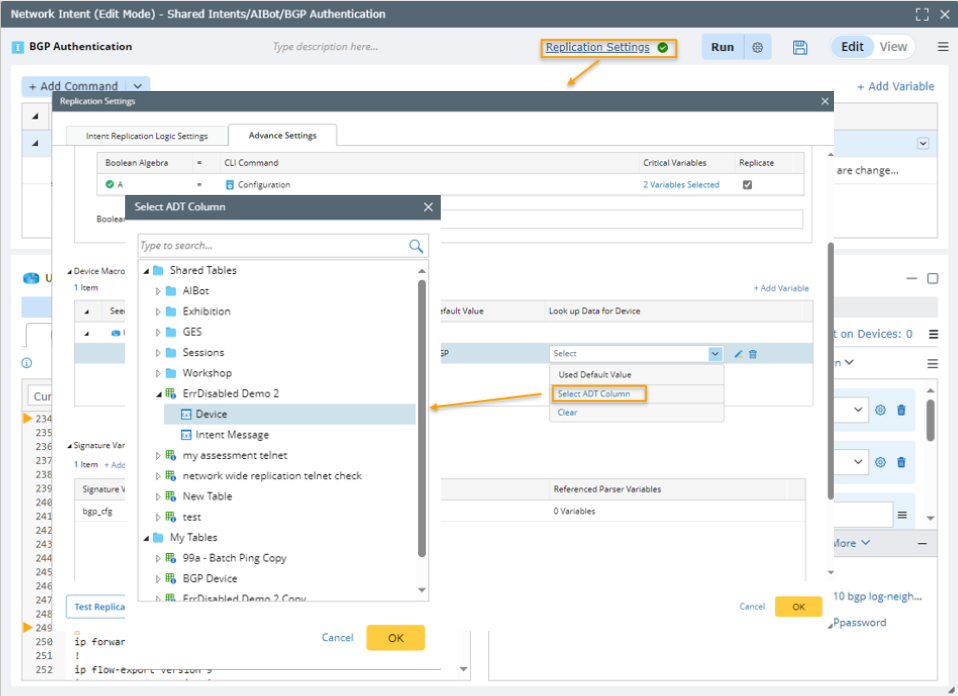
To set the values of macro variables with the data in ADT field, click Select ADT Column, then select an ADT field as the source of the macro variable value. After selecting the ADT variable, you can also configure the Device Key and Decode Filter columns for the ADT Table. For the detailed steps, see Define Macro Variables for Seed Command.