R12 Publication-2025July16
Change Device Style
In the system, links in different topology types can be shown on the same map page. To cohere with link styles, there are two device styles provided:
- Compact Style — suitable for Layer 3 topology.

Tip: When you create a Map from scratch, the involved devices are displayed in the Compact Style by default. - Expanded Style — suitable for Layer 2 topology.
To switch to the Expanded Style for all devices, you can right-click the blank area on the map, and select Change Device Style > Expanded Style from the drop-down menu as follows: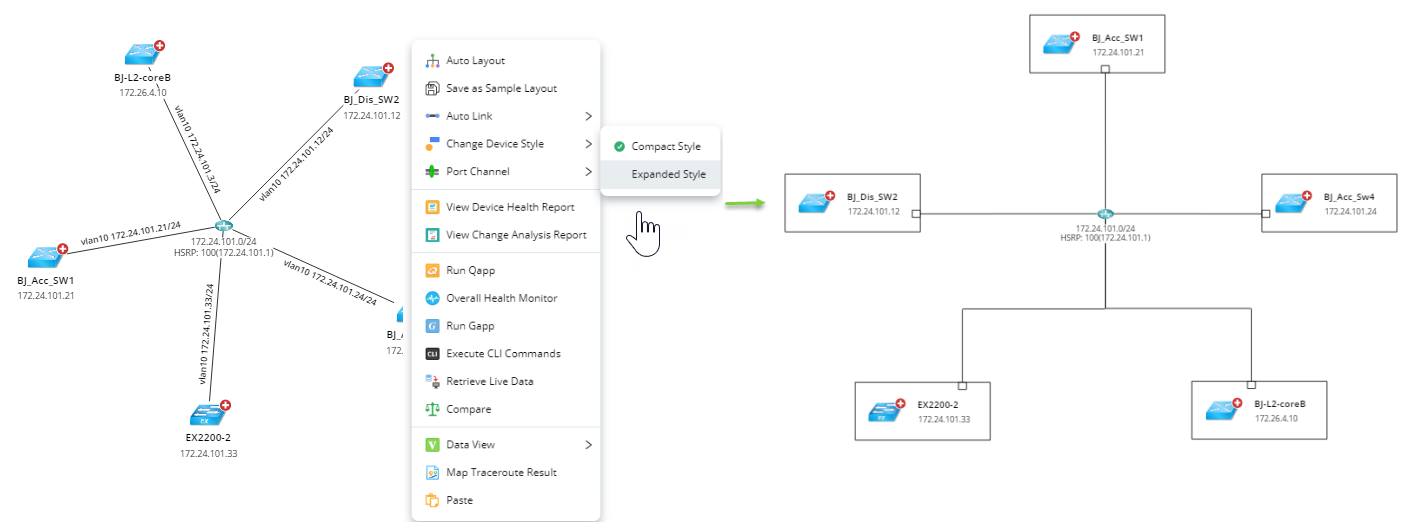
To switch a selected device to the Expanded Style, you can right click the device and select Change Device Style > Expanded Style.
|
|
Tip: By default, all devices on the expanded style are diagrammed with borders as shown in the above screenshot. To change the device view, click Map > Map Page Settings on the Map Toolbar. |