R12.1 Project-2025/11/05
Define Device Access Policy
Device Access Policy provides precise control of access to devices. You can assign specified users to specific policies to determine which users can access which devices.

|
Prerequisite: To define and apply the device access policy, go to System Management > Advanced Settings to enable the Device Access Policy Control. See Enable Device Access Policy for more details. |
- Log in to the Domain Management page.
- In the Domain Management page, click the start menu
 and select Device Access Policy from the drop-down list.
 - In the Device Access Policy dialog, click Add Policy to define the device access policy.
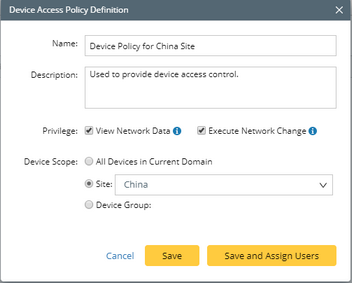
- Enter a unique name Device Policy for China Site and a brief description.
- In the Privilege area, select at least one check box.
Note: In order to execute network change tasks successfully, make sure the privilege Access to Live Network and View Network Change are assigned to users. - In the Device Scope area, select the Site check box and click the
 icon to select China.
- Click Save and Assign Users.
Tip: You can also assign users on the Share Policy tab, or apply the policy to users when adding users in the System Management page. If a defined policy hasn't been assigned to any user, all users do not have the two privileges: View Network Data and Execute Network Change. - Click Assign User.
- Select the user to assign the policy.
- Click OK.
Note: A relogin for the selected user accounts is required to apply a policy.