R12.1 Project Publication-2025Dec23
Set up API Server in NetBrain
NetBrain retrieves Aruba Orchestrator data through the Orchestrator Manager by using APIs. Follow the steps below to add an Orchestrator Manager and specify the address and user credentials to access the manager in the system.
Discovery requires the Aruba Orchestrator URL and the username/password (local account).
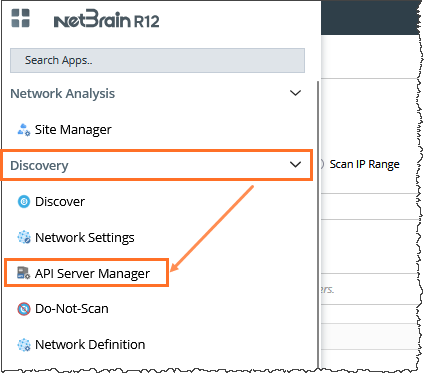
- On the Domain Management page, navigate to Discovery > API Server Manager.
- In the API Server Manager page, click Add API Server to add an API Server entry into the table for each account to be monitored.
- Enter a unique Server Name.
- Enter the description.
- Select the API Source Type as Aruba Orchestrator.
- Enter the Endpoints.
- Enter Username and Password.
- Select a Front Server.
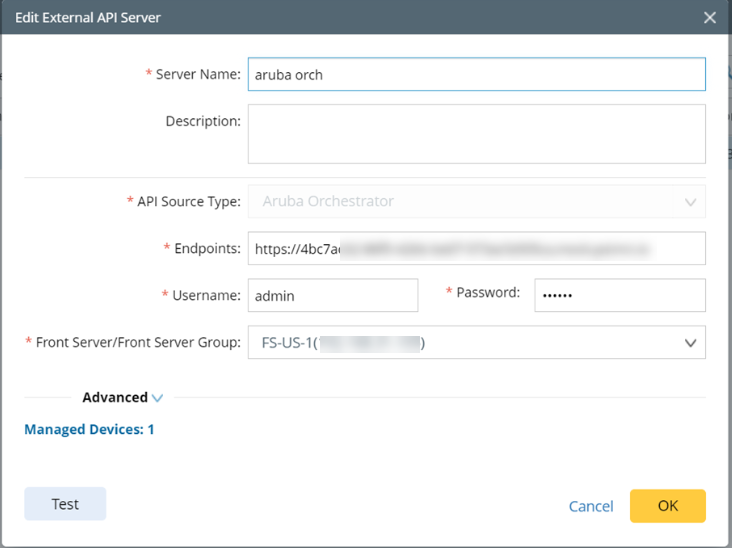
- Click OK.
The selected Front Server can be used for the discovery and retrieve API data.

|
Note: Devices in sleep mode or offline state will NOT be discovered. |
|
|
Note: Both Get and Post methods will be used to retrieve datatable. |