R12.1 Project Publication-2025Dec23
Defining the Benchmark After Node
The Benchmark After node is used to collect network data after the change is implemented, thus verifying if the change has been deployed successfully. Additionally, the benchmark results will be compared with the data collected in the Benchmark Before node.
- Select the Benchmark After node in the runbook.
-
In the Benchmark After pane, define the following settings:
- Select the target devices for the benchmark.
-
Add CLI commands using either way.
-
Manually enter a CLI command and click Add. You can add multiple commands
-
Click the
 icon to select Load CLI Templates to batch add commands
.
icon to select Load CLI Templates to batch add commands
.
-
Click select data to select the data types that you want to retrieve.
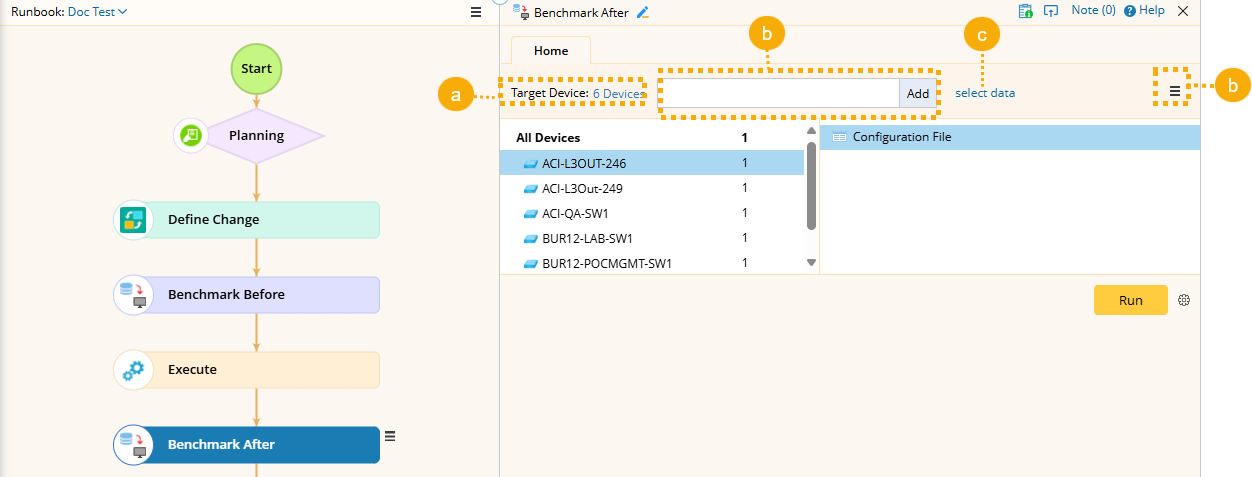
- Click Run.

Note: The data will be updated in the current baseline by default. If you want to change the option, click  and deselect it in the pop-up window.